How to Read the Stepping Specifications
The  Show Knitting Specifications option of the dimensioning view shows the knitting specifications of the current
shape.
Show Knitting Specifications option of the dimensioning view shows the knitting specifications of the current
shape.
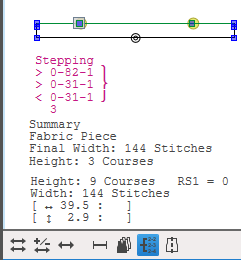
The specifications for stepping, start and a summary will be generated automatically.
By the Content Layout you can specify, wether or not the stepping specifications appear
on the hard copy.

Stepping Specifications in the Dimensioning View
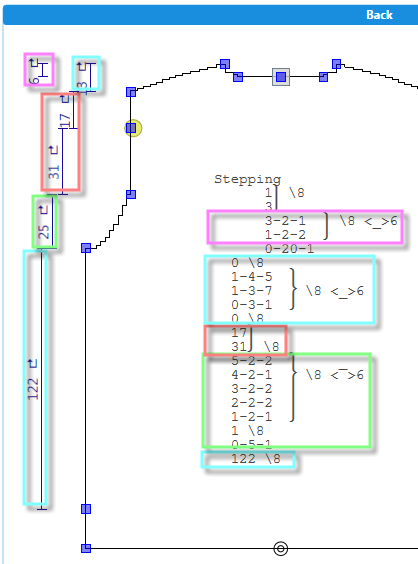
-
From bottom to top
-
Area of the start will not be regarded
-
Line attributes are combined behind the bracket
Stepping Specifications of a Shape Line
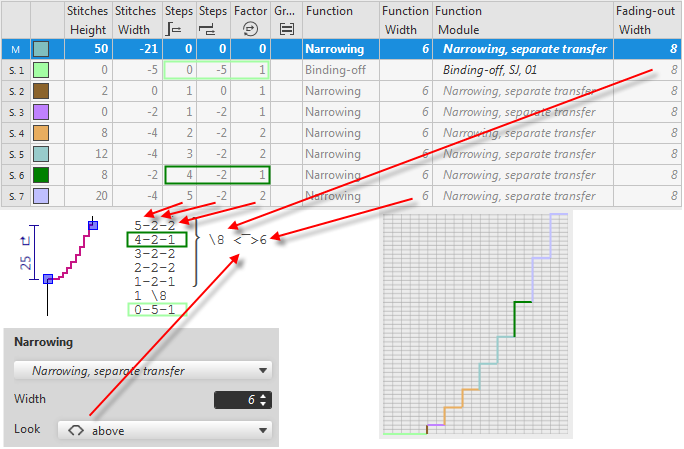
-
Each line corresponds to a sub-row of the shape line from the line table
-
Inverted order regarding the line table
-
Above and underneath look of narrowing appears by the <_> and < > characters before the narrowing width
-
\ 8 e.g. stands for a narrowing width of 8 stitches