Fabric Pieces and Sizes
In the Fabric pieces and Sizes tool window you manage the fabric pieces of the shape file.
You can call up the tool window with  Fabric Pieces and Sizes in the Parameter group of the ribbon Start.
Sizes
Shows the sizes within the current shape file.
- Click an entry to select this size.
- You can edit fabric pieces of the current size in the views.


Context menu of this column:
-
Add Size Before..
Opens the Add New Size dialog box. Add New Size
 -
Add Size Below...
Opens the Add New Size dialog box.Add New Size -
Add New Sizes...
Opens the Add New Sizes dialog box.Add New Sizes -
Recalculate Size...
Opens the Recalculate Size XL dialog box.Recalculate Size -
Delete Size
Removes the current size without prompt. -
Remaining size gets basic size
-
The remaining size at last cannot be removed.
-
Use as Basic Size
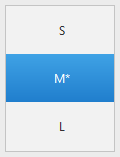
The other sizes will be graded based on the basic size.
The asterisk stands for basic size.
Example
-
Rename...
Rename current size.
You can name the sizes in any way.
The size S–XL are preset as examples.
Fabric Pieces
Shows the fabric pieces within the current shape file.
Shows the fabric piece in the current size in the dimensioning view if the  show icon is active.
-
New Fabric Piece
-
Duplicate
-
Flip Vertically
-
Delete
-
Rename...
-
Properties
Properties of Fabric Piece -
Click on the
Shows the fabric piece minimized only.
-
Click on the

Shows the fabric piece maximized.