How to Enter Correction Values
Correction Values
-
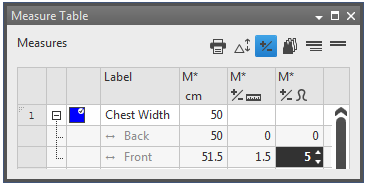
A constant correction value can be assigned to every dimensioning in use, whether they are independent or dependent.
-
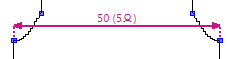
For example 5 stitches as seam allowance without distorting the actual measure.
-
For seam allowances you use correction values as length values.
-
For compensating a stepping you enter the correction value as stitch number.
As length value:
- A correction value for the seam allowance in the back is to be assigned to a dimension.
- The dimensioned shape is opened in the Dimensioning View
 .
.
- The measure unit cm is preset.
- The starting size is drawn and dimensioned completely.
- The Dimensions
 tool window is open.
- Activate the correction value
 symbol above the Measure Table.
- The correction value columns for length measures
 and stitches
  appear.
- Go to the desired row in the Dimensions table.
- Enter the correction value as length value in the column.
- Depending on the stitch density the corresponding stitch number appears in the column.
- The position of the shape points adjusts to the dimension length plus the correction value.
- With the active
 symbol in the status bar of the dimensioning view, the correction value by stitches
appears in brackets above the corresponding dimensionings.
symbol in the status bar of the dimensioning view, the correction value by stitches
appears in brackets above the corresponding dimensionings.
 |
The correction value for a dependent dimension is entered the same way.
|
As stitch number:
- A correction value is to be assigned as stitch number to a dimension for compensating a stepping.
- The dimensioned shape is opened in the Dimensioning View .
- The measure unit cm is preset.
- The starting size is drawn and dimensioned completely.
- The Dimensions tool window is open.
- Activate the correction value symbol above the Measure Table.
- The correction value columns for length measures and stitches appear.
- Go to the desired row in the Dimensions table.
- Enter the correction value as stitch number in the column.
- Depending on the stitch density the corresponding length measure appears in the column.
- The position of the shape points adjusts to the dimension length plus the correction value.
- With the active symbol in the status bar of the dimensioning view, the correction value by stitches
appears in brackets above the corresponding dimensionings.
|
|
Correction values can also be entered if the knitting technique requires it.
|
More Information:

