What was new in 7.1?
This M1plus software version: V 7.1
M1plus V 7.1 is compatible to the machine operating systems:
- EKC 2.1
-
V_OKC_006.005.000_STOLL
What is new in OKC 6.5?
Yarn Carrier Colors for ADF
Yarn carrier colors for ADF and for the other machines were represented by different colors and color numbers.
Yarn carrier colors for ADF machines now correspond to those for the other machines.
Examples:
Yarn carrier 4L (#81) to #82
Yarn carrier 5R (#78) to #79
Yarn carrier 6R (#74) to #75
- Changing the machine (ADF <-> CMS) will keep the yarn carrier colors of the tracks 1-8 identical!
- Jacquards, Color Arrangements and Module Arrangements have identical colors.
- The existing patterns (*.mdv) will be converted automatically.

- ADF 830 ki
The gauge E10.2 is supported.
- ADF 530-32 ki BW TT med
Classification 822
Upgrade of ADF 530-32 ki BcW - ADF 530-16 ki BW TT med
Classification 822
Upgrade of ADF 530-16 ki BcW - New classification as EKC ki
EKC1 | EKC 1 | Stoll |
| EKC-ki | EKC 2 |
|---|---|---|---|---|---|
CMS 730 T | 591 | 282 | -> | CMS 730 ki T | 593 |
CMS 830 S | 664 | 281 | -> | CMS 830 ki S | 831 |
CMS 330 HP W TT Sport | 695 | 298 | -> | CMS 330 ki W TT Sport | 814 |
CMS 330 HP BW TT Sport | 695 | 299 | -> | CMS 330 ki BW TT Sport | 814 |
New k&w-Starts for Gauge E 8.2 and higher
|
| |||
|
| |||
|
| |||
|
| |||
|
|
| ||
|
|
| ||
|
| |||
|
|
| ||
|
|
| ||
| ||||
|
| |||
|
|
| ||
|
|
| ||
|
| |||
|
|
| ||
|
|
| ||
| ||||
|
| |||
|
| |||
|
| |||
| ||||
|
| |||
|
| |||
|
| |||
|
| |||
| ||||
|
| |||
|
| ||
|
| ||
|
| ||
| |||
| |||
| |||
| |||
| |||
| |||
| |||
| |||
| |||
| |||
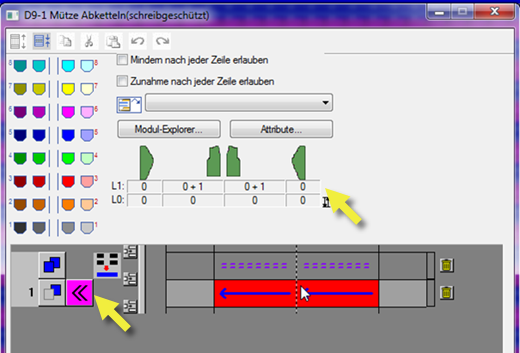
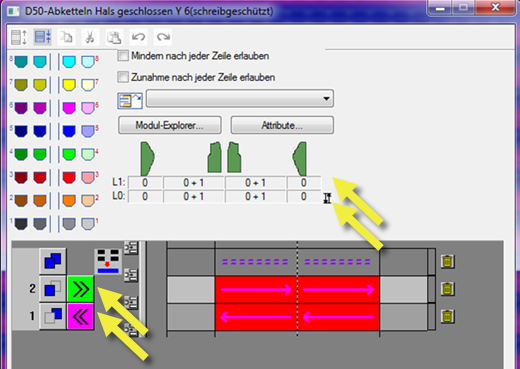
Both carriage directions now:  L0/L1 closed, flat seam
|
| ||
|
| ||
|
| ||
|
| ||
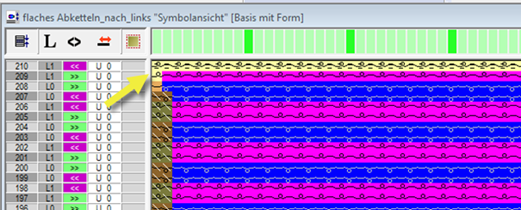
L0/L1 closed, flat seam <
- You assign the module in the shape.
- Binding off by an additional row from the right to the left
- The module group contains the necessary knitting sequence.
- The binding-off is carried out on the additional row of knitting layer L1 from the right to the left.
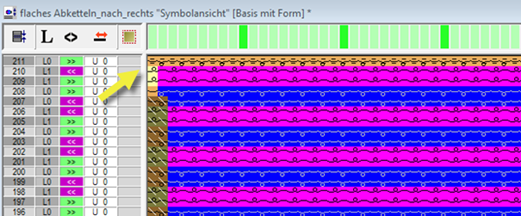
L0/L1 closed, flat seam >
- You assign the module in the shape.
- Binding off by an additional row from the right to the left
- The necessary knitting sequence for the knitting additional row L1 and the additional row L0 is taken automatically from the k&w Arrangements / Stoll / 1 area / bind-off collar / without opening module group.
- The binding-off is carried out on the additional row of knitting layer L0 from the left to the right.
Binding-off k&w with Flat Seam
Special machines and gauges require specific pattern parameters:
- These pattern parameters are saved by default as Stoll templates in files with label for machine classification, gauge and further settings.
- Example:
D:\ Stoll\ M1plus\<Version>\ ConfigData\GlobalParameters_752_E9.2.mdv - When selecting a specific machine and gauge in the New pattern dialog box, the file with the corresponding pattern parameters is automatically loaded.
- Further settings beside machine classification and gauge:
- Belt Take-Down (_B)
- Belt Take-Down with Comb (_Bc)
- Quantity of yarn carriers for ADF 682 + ADF 686 (_Y)
- You can save your own pattern parameters as your own template, the pattern parameters that differ from the Stoll templates.
- Example:
D:\ Stoll\ M1plus\<Version>\ConfigData\Private\GlobalParameters_752_E9.2.mdv - Your own pattern parameters are automatically loaded, when selecting the corresponding machine and gauge in the New pattern dialog box.
- Some pattern parameters will be copied to the corresponding directories by the update to the new release.
D:\ Stoll\ M1plus\<New version>\ConfigData\Private\...
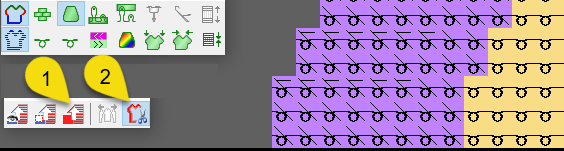
With the (2) option of the Control View (1) toolbars, the pattern will be displayed by shape symbols in the cut out state. Control Views

Images and colors of the GKS shape will be displayed.