Miscellaneous
- Hide Control Columns
The ÷ key on the keypad narrows the control column width stepwise. When using the last (fourth) step, all the control columns are hidden. However, the first of the previously visible control columns are maintained (usually the control column of the pattern or technical rows, where a row selection can be generated). With the x key the control columns are displayed again. - Coordinate display at the cursor
Now, the yarn carrier correction is also displayed at the cursor. You have to activate the date in the Coordinate display dialog box. more - Zoom switching with Z key
With the Z key the zoom level is switched to displaying the entire pattern in the display window. Activating again the Z key restores the previously used zoom step. The position of the pattern to which the cursor points is maintained in the display.
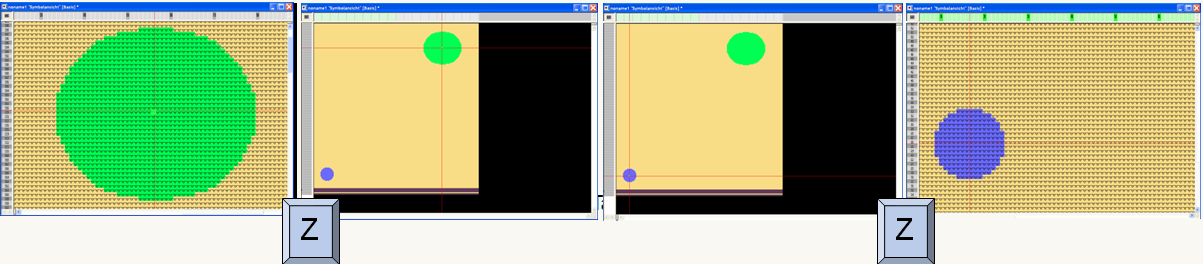
more - Key combinations
1) Protecting selection: P: Protecting selection; Ctrl+P: Cancel protection completely; Ctrl+Alt+P: Cancel Protection from Selection
2) Presentation types of the Symbol View: Shift+F7: Yarn color for the background, module color for the symbol; Shift + F8: Module color for the background, yarn color for the symbol
3) Loading the pattern state: Ctrl+Shift+F10: Load basic pattern
4) F5 + F6: With this key combination, the needle action and the yarn color are taken if the module color is displayed for the background in the symbol view. - Control column Fabric take-down: In the tooltip of the control column the values for WN% and WMK% are also displayed now.
- The entries in the Pattern Parameter tables that are not in use in a pattern can be removed.
This way the memory size of a pattern can possibly be reduced and the work with the program can be accelerated. The patterns generated with this version automatically clean up unnecessary data in the modules, Color Arrangements and Module Arrangements. more - In case of patterns with column cycles ("repeatable part") the WMN is basically prefixed to the pattern width.
- Intarsia Border Processing with interlock
For the Intarsia border processing a two-row module (two pattern rows) is available under Technique/Intarsia/Border processing/Feeding/Two-row stitch (border processing). This module can be selected in the Yarn Field Allocation dialog box in the
Note: The following additional settings are necessary:
1) Configuration dialog box: Default
This setting is necessary for the Interlock knitting rows not to be interrupted by another knitting row.
2) Yarn Field Allocation dialog box, columns: 0
This setting is necessary for the module to be inserted starting with the first needle. - Global pattern parameters changed for MSEC 0. more
-
k&w configuration dialog box: The distance between two fabrics (SEN) distance is also adjustable with k&w. A k&w fabric can be positioned left or right-aligned on the needle bed now.
- If after the Sintral function, which is called-up within the pattern, the definition of the yarn carriers is to be repeated in Sintral, prefix the Sintral function name with +++.
Example: F:+++MYFUNCTION; More - Technical Processing: Reading out the cycles from module and pattern
If cycles are present in the same rows of modules and the pattern, a prompt appeared until now asking whether the cycles of the pattern or of the module were to be used.
Now, the cycles of the module are applied without prompt maintaining the cycles of the pattern as long as no invalid overlapping occurs. In case of an overlapping the previous prompt appears. - The Jacquard net pick-up now takes into account the offset of the jacquard back and will be moved matching the Jacquard in case of a horizontal offset > 0.
- The line number range of a MC jacquard can be set starting with 1000 now (until now 1100).
- The Sintral Check starts immediately, if it is called-up via the button in the toolbar. If the Sintral Check is called up via the menu the start is not carried out so that individual settings can still be made in the Sintral Check
- Knitting time comparison directly executable with mdv, zip and sin files
A knitting time comparison can be carried out with the Knitting Time Comparison program using directly the mdv, zip and sin files. Until now only simx files could be used, which needed to be generated with Sintral Check. more -