Yarn carrier allocation (Yarn field allocation)
In this section it is specified with which yarn carriers the pattern is to work.
In the default setting the yarn carriers are in the Undefined yarn carrier magazine. If yarn carrier specifications exist for the pattern, then these are already offered for the corresponding yarn carrier rail if the yarn of this yarn carrier is contained in the display window.
Yarn carrier specifications for the yarn carrier rail and for the yarn carrier distance (YD) are applied from the database of the active machine to the Machine attributes of the pattern. You can change these specifications in the Yarn carrier allocation dialog box.
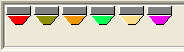
The symbol consists of the yarn color and a marking for the yarn carrier type and for the yarns at the beginning. In addition, the number of the yarn carrier field is displayed if the yarn carrier is located in the magazine.
The different colors of the technical yarns for the start are not shown in the yarn carrier symbol.
The yarn carriers are shown as symbols:
|
| Yarn Carrier Type | Use |
|---|---|---|
| Undefined | as |
|
|
|
| and | Intarsia with swiveling yarn carriers |
|
| Plating with double feeder (Oblong hole) |
|
| Plating with a yarn carrier with two bows. |
|
| Plating with two yarn carriers |
|
| Weft yarn carrier |
| Draw thread | Normal yarn carrier for the draw thread |
| Elastic Thread | Normal yarn carrier for the elastic yarn |
| Protection Thread | Normal yarn carrier for the protection thread |
| Comb Thread | Normal yarn carrier for the comb thread |
| Rib thread | Normal yarn carrier for the rib thread |


 .
.


How to call-up the context menu regarding yarn carriers:
- In the Configuration / Knitting areas dialog box, the corresponding devices are activated.
Knitting Areas tab
- 1
- Click on the desired yarn carrier
 with the right mouse button.
 - The context menu of the selected yarn carrier appears.
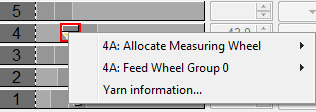
- Select the measuring wheel in the submenu.
Basic Settings - Select the feed wheel in the submenu.
EFS 820
EFS 920 - Y -> Group (tab)
- Open the Yarn information dialog.
Yarn information
A maximum of 32 yarn carriers can be displayed. For a pattern with more yarn carriers, these will not be shown completely . Reduce the colors present in the pattern.
Settings in the center of the section:
|
Element |
Meaning | |
|---|---|---|
|
Yarn carrier magazine |
One magazine each on the left and right-hand side for yarn carriers that are still not allocated to a yarn carrier rail. The left or right home position is dependent on the set direction in the and section. The change in the home position changes the knitting-in and knitting-out direction and vice versa. | |
|
ID |
Display the yarn carrier number when running with the mouse over the yarn carrier. | |
|
Yarn carrier rails |
Graphic presentation with the available home positions at the left and right. | |
|
YD/YDI |
YD |
Input field for the yarn carrier distance from the left or right fabric selvedge. The value range (in 1/16 inch) lies between 0 and 160. Changes cause the home positions on the rail to be moved in the graphic.
|
|
YLR |
Select additional yarn carrier rail for the two carriages with tandem mode. | |


 :
: The yarn carrier can be dragged to a position with Drag & Drop. The following possibilities are available:
- from the Undefined magazine onto a yarn carrier rail
- within the yarn carrier rail on the other side
- from the yarn carrier rail onto another yarn carrier rail
- from the yarn carrier rail into the Undefined magazine
Cursor shape during Drag & Drop
|
Cursor | Meaning |
|---|---|
| Permitted position on a yarn carrier rail. |
| Impermissible position for setting down the yarn carrier |


Settings on the left side:
Element | Meaning | |
|---|---|---|
List field for the SEN | In the Configuration dialog box (Comb, Clamping section) the number of knitting zones can be set in the SEN list field. The value affects the number of home positions. The more knitting areas, the fewer yarn carriers are available per rail. After technical processing the yarn carrier allocation can be displayed for each knitting zone via the list field. | |
Input field | Enter a comment. | |
| Take the yarn carriers out of the clamps and knit them in before the draw thread. | |
|
| Stop the yarn carrier at the shape edge. |
| Stop the yarn carriers at the SEN edge. | |
| Yarn carrier home position with fully fashion knitting. A yarn carrier with this setting is moved to the position on the left edge (counter #L) or right edge (counter #R). | |
| Exclude yarn carriers from releasing the clamps by Y-RALL. | |
| A yarn carrier with this setting is moved with float (without needle raising) to its home position.
| |
| A yarn carrier with this setting is knit-in before the start to the opposite side of its home position. | |
| With this setting, vertical floats of this yarn carrier will be fixed at the fabric selvedge. Border Fixation(Yarn field allocation) Border Fixation (Control column) Additional settings tab(Configuration) | |



 column of the yarn field table.
Settings on the right-hand side:
Element | Meaning | |
|---|---|---|
List boxes for the stopping position | Changing manually the stopping position of the selected yarn carrier. | |
| HL | Parking position on the left side |
HR | Parking position on the right side | |
Input fields for engaging value | Enter the values for the variable engaging width of the plating yarn carriers type U+/-. Minimum value: 11.5 mm | |
| Ua | Engaging value from the center of the yarn carrier carriage up to the stop point of the yarn carrier plunger on the left side. |
Ub | Engaging value from the center of the yarn carrier carriage up to the stop point of the yarn carrier plunger on the right-hand side. | |
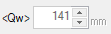
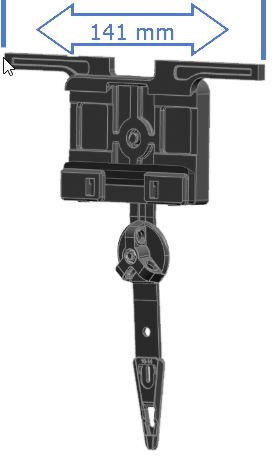
| Driving width of the weft yarn carrier Minimum value: 137 mm
Setup date: Width (tab) | |
NCC | Select the clamping depth of the clamping and cutting needle. Minimum value: -25
| |
YDF | Input field for the additional yarn carrier distance during fully fashion knitting. The value range (in needles) lies between 0 and 20.
| |
Button
| The KI / K<I> dialog box for the yarn carrier correction in the setup is opened. | |