What was new in 7.0?
This M1plus software version: 7.0
M1plus V7.0 is compatible with machine operating system EKC 2.1
Deflecting Presser Foot
 Only EKC 2.0
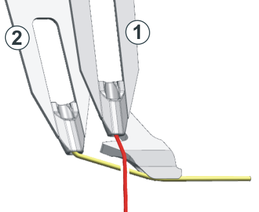
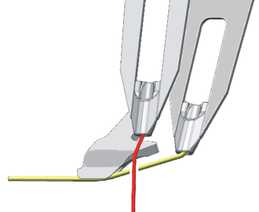
Upright threads on front tracks only
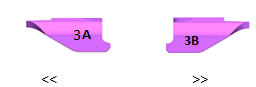
- Upright threads on front and center tracks as far as possible
- Track 3, 4 and 5
- Weft yarns on rear tracks only
- Track 6
- Presser feet from the rear only
Options and - Plating color with weft yarn and the
- Benefit:
- More tracks available for yarn carriers parking in the fabric (upright threads)
- Free presser foot units available to mount other types
Type 2 with deep groove for areas without upright threads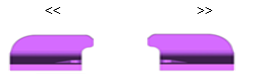
Settings
- Presser Foot tab
- of Machine Properties
- of Machine Attributes
- Control column Presser Foot (ADF-W, CMS-W)
Use
- As weft yarn presser foot with:
- Normal yarn carriers
- Weft yarn carrier type Qw
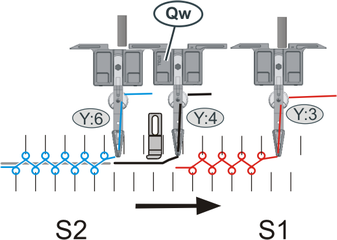
- As knitting-in presser foot
- New:
Leading weft yarn carrier for all CMS W machines.
Yarn Carrier Type Qw, in Sintral as well.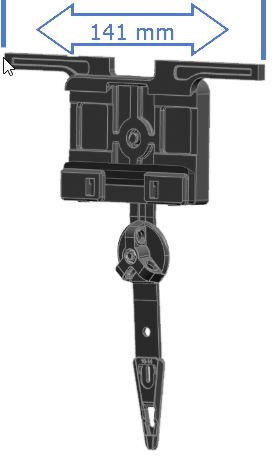
- Driving width: 141 mm
Define a different driving width in the Yarn Field Allocation dialog box. Yarn carrier allocation (Yarn field allocation)
 - Pushed by system 2 or 3 to get the necessary weft yarn presser foot available.
- W Machine - New Weft Yarn Carrier Qw
Editing *.jac files:
- If you open, edit and save a *.jac file, no *.mdv file (pattern) but a *.jac file will be saved.
- If you drag a *.zip file (knitting program) per drag-and-drop to the M1plus, the M1plus checks wether a *.jac file is contained in the *.zip file.
- The *.jac file will get temporarely unzipped and opened.
- When saving, the edit *.jac file will be overwritten and saved back to the *.zip file.
- Use
 7-Zip as standard application for *.zip files.
- The / / menu is renamed correspondingly.
/ / Import MC Jacquard...
New Sintral Command EXIT
Finalizing a cycle when a certain condition is fulfilled.
Example:
Float and Lock modules for CMS 502 Bc
| ||
|
| |
| Float and Lock_Bc [8--8] | |
|
| Float and Lock_Bc [0--8] |

- The cycle will be repeated as far as the fabric is handed over.
- The comb moves to its lowest position after handing over the fabric.
#140=0 - The cycle is finished with this condition.
IF #140=0 EXIT RBEG
Note:
IF #140=0 EXIT RBEG before the cycle end (REND)
In order to have the yarn carriers on the matching side of the machine for the following knitting row and to have the matching carriage direction.
IF #140=0 EXIT RBEG
REND
How to use the EXIT Sintral command:
- within a cycle
RBEG
:
IF xxx EXIT RBEG
:
REND - within a repetition
REP
:
IF xxx EXIT REP
:
REPEND - if a condition is met
- Example:
IF #140=0
if counter 140 gets value 0. - IF-decisions
New "EXIT" command - Finalizing a cycle when a certain condition is fulfilled
Configuration Counters
These counters represent the equipment of the machine.
#MCC=0 | Clamping and cutting bed on the left and right available |
#MCC=1 | Clamping and cutting bed on the left and right not available |
#MCC=2 | Clamping and cutting bed on the right available |
#MCC=3 | Clamping and cutting bed on the left available |
#MTCCW | Coupling width in inches (tandem with comb) |
GETTIME | Apply the time to the counters 219, 220 and 221 |
#MTDSYS=0 | No Take-down |
#MTDSYS=1 | Main Take-down |
#MTDSYS=2 | Main take-down + Auxiliary take-down |
#MTDSYS=3 | Main Take-down + Comb |
#MTDSYS=4 | Main Take-down + Auxiliary Take-down + Comb |
#MTDSYS=5 | Belt Take-Down |
#MTDSYS=6 | Belt Take-Down + Comb |
Yarn Carrier Counters
These counters represent the parking positions and allocations of the yarn carriers.
#POGS | Parking on the initial side |
#PNGS | Parking on opposite to the initial side |
#PY[] | Yarn carrier parking within fabric |
#IYN | Tracking the yarn carriers
|
YFLP:= | List allowed yarn carriers |
YFLN:= | List excluded yarn carriers |
knitelligence
CMS 303 HP B TT Sport

- With 0 –-- 12 clamping and cutting points
 0 –-- 12 on Options tab 0 –-- 12/12 in the Sintral Check (program)
 - Without clamping and cutting points on Options tab
New k&w-Starts for CMS 202 HP B
|
| |||
|
| |||
|
| |||
|
| |||
|
|
| ||
|
|
| ||
|
| |||
|
|
| ||
|
|
| ||
STOLL-autocreate®
Creating knitting programs automatically without editing manually at the pattern workstation.
- Individualized products
- Coustomized products
- Optional design by the end user
- Sets of sizes for an article
- Trend articles and merchandising products
The main steps
- Preparation
- Generate pattern template without shape.
Machine type, gauge and maximum size of pattern - Create all necessary CA.
With preset colors - Define and check knitting technique.
- Define and register the automatic steps of processing.
Create script. - Automated Steps
- Create new pattern (*.mdv)
Based on prepared template - Import Image
Motif with colors of the CA
e.g. by STOLL-artwork® - Loading shape or importing it by an image
e.g. by STOLL-artwork® - Cut-out Shape
- Allocating CA row by row
- Running technical processing
- Creating, checking and extracting the knitting program
- Exit the M1plus
What you need:
- More info via the STOLL Helpline
- http://software.stoll.com/gks/help/2.3/en-US/6038032139.html

- EKC 2.1 equipped with keyboard, mouse and smart card reader
- Remote access to M1plus Workstation

- Smart Card at touch panel only
- Exit M1plus before removing the smart card.
- Smart Card at both computers
- M1plus may stay running.
- No or restricted touch functions only
- No gestures beside zooming
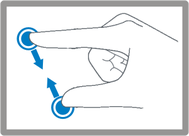
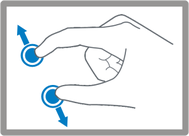
- You can move the Configuration and Yarn Field Allocation dialog box by the mouse wheel pressed.
 Save the window settings of M1plus for the remote access.
Control electronic feed wheels by CAN bus
- The feed wheels of the manufacturer Memminger of the Type EFS 820 and EFS 920 are supported.
- The DEVOUT commands will remain supported for a time of transition.
A mixed operation of DEVOUT commands and the new Sintral commands are inadmissible. - More on the subject Feed wheels
Advantage of controlling by CAN:
- Up to 100 groups of feed wheels
- Error messages directly by the EKC user interface
Modifications within M1plus:
 Activate feed wheels check box removed from the tab.
Knitting Areas tab- New options on the Machine Properties / Options tab in the section
-
-
- Options tab in MC Attributes or Machine Properties
- Allocation to groups in the Yarn Field Allocation dialog box and in the Setup Editor
- 6 groups for serial controlled EFS
- 100 groups for CAN bus controlled EFS
- column for CAN bus controlled EFS
- Feed Wheels tab in the Setup2-Editor
- Context menu of yarn carriers in Yarn carrier allocation (Yarn field allocation)
- Mixed operation of serial and CAN bus controlled EFS
- Not available on the individual machine!
- Knitting programs with not more than 6 feed wheel groups can be used on machines with both variants.
CMS with STx11 or STx69 controls are no longer supported
- Machines remain available in the machine database.
- Patterns can further more be generated for these machines.
- New functions may possibly not be supported.
- Scope of Sintral Check will no more be enhanced.
Ascon with central yarn feeding from above for ADF machines
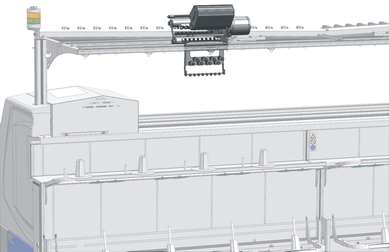
- On the ADF:
ADF - ASCON from Top - In the Setup Editor
Basic Settings - In the Yarn Field Allocation dialog box
- Yarn carrier allocation (Yarn field allocation)
W+PContact Pressure
The default value W+P for the contact pressure is at least 4 now.
Values > 4 are unchanged.
- globalparameters.mdv
- CMS x30S
- globalparameters_553_554_625_633_664.mdv
- globalparameters_553_554_625_633_664_ge9.2.mdv
- CMS 830 C, CMS 520 C +
- globalparameters_570_629_647_652_573_631_662_672_666.mdv
- CMS 502, ….
- globalparameters_626_637_638_645_646_653_654_575_577_579.mdv
- CMS 502 HP +, ….
- globalparameters_668_669_658_690_691_692_693.mdv
- ADF 830-24, ADF 530-32
- globalparameters_681_682_686_688_649_650_803_804_808_809_825_822.mdv
Devoré (1 system)
System conversion for devoré pattern techniques
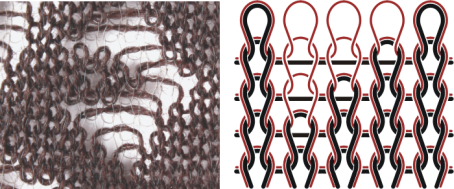
- ADF D5“with EKC 2.1
- System Conversion for Devoré (1 system)
Configure in System functions tab - Motif thread and binding thread by one plating color
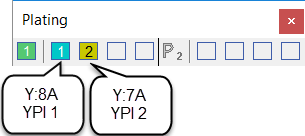
Plating (toolbar) - Entry in the System Function control column
- Do not use the Sintral commands SX and S0Y in the knitting program.
- Not possible as combination with
 !
!