What was new in 6.4?
Windows XP
- M1plus V6.4 / V6.5 can not be installed toWindows XP
- Windows Vista or higher required
- Installation will be canceled
- Hardware-Requirements
- M1plus V6.4 / V6.5 is compatible with machine operating system OKC 6.2
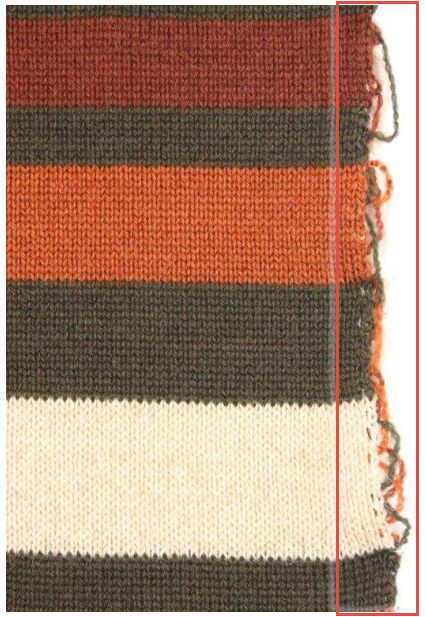
Filler Yarns at Lateral Fabric Selvedges
Divided stitch cam
- New system function

System functions tab
Divided stitch cam
Holding-deep by tuck function - New System Function
Stitch via split curve (control column System Function) 


Cam specification S:$AY-T; will be created here if stitches are inserted within this row on front and rear needle bed.
Cam specification S:#XS%n-%m; for technical splitting will be created here if stitches are inserted on facing needles together with divided stitch cams.
Jacquard and Intarsia
Handling
- Sorting module groups by AltGr key pressed.
(or CTRL + Alt)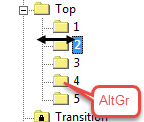
Module groups - 1000 plating colors, handy and easily accessible
Plating (toolbar) - Improved and unambiguous handling of Global Pattern Parameters
- Write protected display of the Stoll specifications
- Creating your own pattern parameters easily and unambiguously
- Using the own pattern parameters for new patterns automatically
- Applying updates to new M1plus versions automatically
 Previous version has still to be installed for the update.
 - Global Pattern Parameters...
- W0 with S0Y
The take-down value (W0) will be set to zero with S0Y active.
Sintral tab - Remote Desktop
You can remote access a M1plus workstation having just one smart card at the Remote-Client.
STOLL M1plus Smartcard up to 2021 - Removal tool for M1plus installations: TabulaRasa.exe
Removing non deinstallable M1plus installations. - You will find the application here: <Installation directory>\Util\TabulaRasa.exe
- The tool browses all drives for \Stoll\M1plus directories and lists them up. Select the corresponding version.
- All registry entries concerning this version will deleted.
- selects all versions and all under \Stoll\M1plus will be deleted.
Attribute Setup data directly to pattern
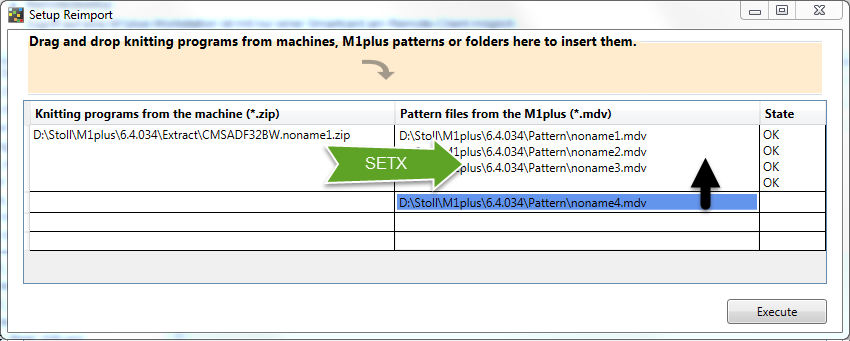
- Setup Reimport
Attribute Setup data directly to one or several M1plus patterns - Make empirical data, gained when setting-up a pattern on the machine, available to all the future usages within the right context.
- No need to open the mdv file
- Apply setx data of one knitting program contained in the zip pattern file to several mdv files by one step
 / / /
/ / / 
RS17 at Fabric End
- Comb / Cast-off ON/OFF with RS17
- Default within the New Pattern dialog box
 = not active
 - With it is not active in Configuration and the Sintral command RS17=1 IF #100=1 RS17=0 will not be inserted at the end of the pattern.
- RS17=0 + RS17=1 - Optimized handling
New Modules for Feeding
|
| ||||
|
|
| |||
|
|
| |||
|
|
|
| ||
|
|
|
|
| |
|
|
|
|
| |
|
|
|
|
| |
|
|
|
|
| |
|
|
|
|
| |
|
|
|
|
| |

- Copy k4D55434B-0000-0000-0001-4B41524C4900 to clipboard and navigate by Ctrl + F7 to the Tuck cast-off {28}- - v - - - ^ - module in the Module Database.
- Module description in the Module Support under:
Module Support : Technique : Intarsia knit-in : Feed-in : Truck front and rear, Castoff